
Delloweb insights
Learning Management System (LMS): A Complete Guide to Modern Education Management
Education has changed significantly over the last few years. A classroom is no longer limited to a teacher standing in front of students, students writing notes in notebooks, and administrators maintaining records in fil...
Education has changed significantly over the last few years.
A classroom is no longer limited to a teacher standing in front of students, students writing notes in notebooks, and administrators maintaining records in files. Schools, colleges, academies and other educational institutions now manage a large amount of information every day.
Student admissions, attendance, classes, teachers, examinations, homework, results, fees, communication, staff records, libraries, transport and many other activities all need to work together.
When these processes are managed separately, even a well-organized institution can face unnecessary delays, duplicate work, missing information and difficulty in tracking performance.
This is where a Learning Management System, commonly known as an LMS, becomes valuable.
An LMS can provide a centralized digital environment for managing learning, students, teachers, academic activities and related educational processes. Depending on the system, its scope can range from online course delivery and assessments to broader academic and administrative management.
- But what exactly is an LMS?
- How does it work?
- What features should an educational institution look for?
- Is an LMS only useful for online classes?
- And how can a school or college choose the right LMS software?
This guide explains the subject from the basics and gradually moves into the more practical and advanced areas of LMS implementation.
What Is a Learning Management System?
A Learning Management System is software used to create, organize, deliver, manage and track learning activities through a centralized digital platform.
In simple words, an LMS gives an educational organization one place where learning information and related activities can be managed.
Instead of keeping course information in one system, student records in spreadsheets, attendance in registers and examination results somewhere else, an integrated LMS can bring important information together.
A typical LMS may help an institution manage:
- Students
- Teachers
- Courses
- Classes
- Lessons
- Assignments
- Homework
- Attendance
- Examinations
- Results
- Learning materials
- Communication
- Reports
- Student progress
Modern educational platforms can go beyond these basic learning functions and include areas such as admissions, finance, HR, library, transport, hostel and inventory management.
This broader approach is particularly useful for schools and institutions that want to manage both academic and operational activities through one system.
What Does LMS Stand For?
LMS stands for Learning Management System.
The three words explain its basic purpose.
- Learning refers to education, training, courses, lessons, assessments and knowledge development.
- Management refers to organizing, monitoring and controlling learning related activities.
- System means the software environment that brings these activities together.
An LMS can therefore be understood as a digital system for managing learning and the activities connected with it.
Is an LMS Only for Online Learning?
No.
This is one of the most common misunderstandings about Learning Management Systems.
An LMS can support completely online education, but it can also support traditional classroom based education and blended learning.
For example, a school may conduct classes physically but still use an LMS to manage:
- Student records
- Attendance
- Homework
- Examinations
- Results
- Teacher activities
- Learning resources
- Parent communication
- Academic reports
A college may use physical classrooms while using the LMS for course materials, assignments, online tests and student progress tracking.
An institution can therefore use LMS software according to its own educational model.
The important point is that an LMS does not necessarily replace classroom teaching. It can support and strengthen it.
LMS vs School Management System: What Is the Difference?
This distinction is important because the terms are sometimes used interchangeably.
A traditional LMS mainly focuses on learning and training activities.
A school management system usually focuses more broadly on the complete administration of an educational institution.
For example, an LMS may concentrate on:
- Courses
- Learning materials
- Assignments
- Assessments
- Student progress
- Online classes
- Training
A broader education management platform may additionally include:
- Admissions
- Reception
- Attendance
- Timetable
- HR
- Payroll
- Accounting
- Finance
- Library
- Transport
- Hostel
- Inventory
- Communication
- Reports
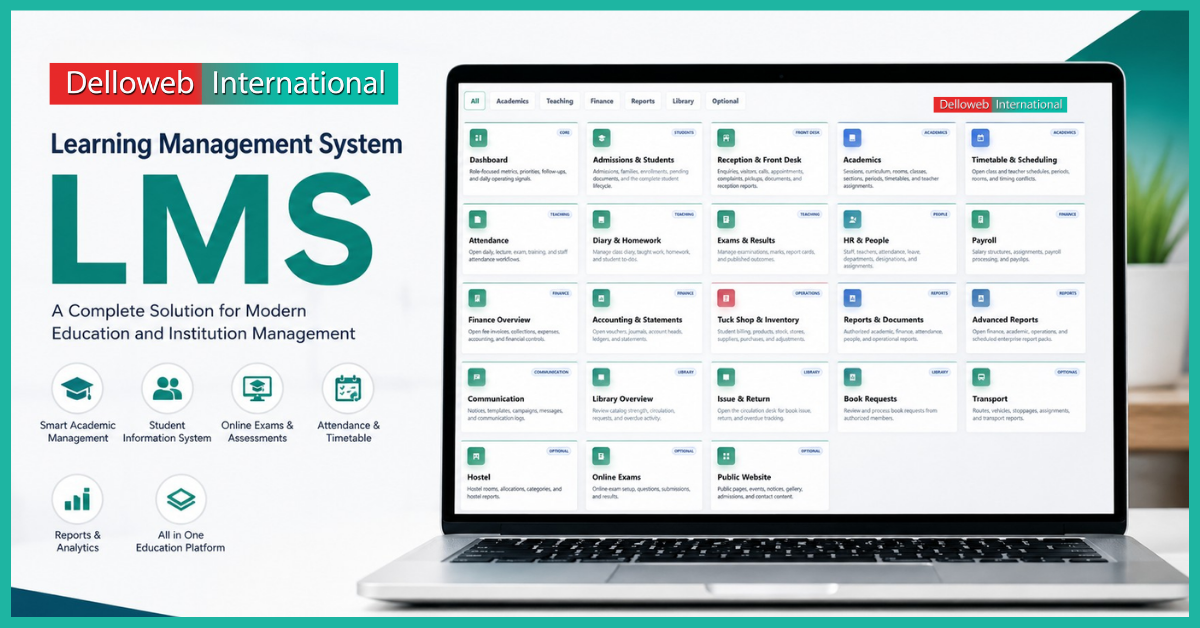
The system represented in the provided design follows this broader model. It places learning and academic functions alongside student administration, finance, HR, library, transport, communication and other institutional operations.
That means the platform is not simply an online course portal. It can be viewed as a broader digital management environment for educational institutions.
This distinction matters when an institution is choosing software. A small training organization may only need course and assessment management, while a school with hundreds or thousands of students may need a much wider operational system.
Why Do Educational Institutions Need an LMS?
Running an educational institution involves much more than teaching.
Every day, administrators and teachers deal with information.
A student joins the institution. Their personal information needs to be recorded. Their class needs to be assigned. Attendance needs to be maintained. Teachers need to record academic activities. Homework needs to be managed. Examinations need to be organized. Results need to be prepared. Parents may need updates.
When these processes are handled manually, the workload increases as the institution grows.
An LMS can reduce this problem by centralizing information and creating structured workflows.
The goal is not simply to make an institution look more digital.
The real goal is to make daily educational work more organized, traceable and manageable.
Key Features of a Modern Learning Management System
The features of an LMS can vary depending on the institution, but a comprehensive education focused system may include several important areas.
1. Dashboard
A dashboard gives administrators and authorized users a quick view of important information.
Instead of opening different sections to understand what is happening, users can see important operational signals from one place.
A useful dashboard may show:
- Student information
- Attendance information
- Pending activities
- Academic updates
- Financial information
- Reports
- Notifications
- Upcoming examinations
- Important tasks
The dashboard should not simply display numbers. A good dashboard helps users understand what requires attention.
2. Admissions and Student Management
Student management is one of the most important parts of an educational system.
A digital LMS or education management platform can help maintain student information from admission through their academic journey.
This may include:
- Student registration
- Admission records
- Class assignment
- Student profiles
- Parent information
- Documents
- Academic records
- Enrolment status
- Student history
Centralizing this information can make it easier for authorized staff to find the right record when needed.
A well-structured student profile can also reduce the need to repeatedly enter the same information in different places.
3. Academic Management
Academic management is at the heart of an education focused system.
It can help institutions organize:
- Academic sessions
- Classes
- Sections
- Subjects
- Courses
- Curriculum
- Teachers
- Periods
- Assignments
Teachers and administrators can work from structured academic information instead of maintaining disconnected records.
This becomes particularly important when an institution has multiple classes, departments, teachers and academic sessions.
4. Timetable and Scheduling
Creating a timetable manually can become complicated when many teachers, rooms, classes and subjects are involved.
A digital scheduling system can help institutions organize:
- Class schedules
- Teacher schedules
- Rooms
- Periods
- Subjects
- Academic sessions
It can also help identify scheduling conflicts before they create problems.
For example, if the same teacher is assigned to two classes at the same time, the system can help administrators identify the conflict.
Good scheduling is not only about creating a timetable. It is about making sure the timetable works in practice.
5. Attendance Management
Attendance is one of the most important days to day academic records.
A digital attendance system can help teachers and administrators maintain attendance information more efficiently.
Depending on the LMS, attendance may be recorded for:
- Students
- Teachers
- Staff
- Classes
- Lectures
- Examinations
- Training sessions
Digital attendance records can also make reporting easier.
Instead of searching through registers to determine attendance percentages, administrators can access organized records and generate reports.
Some modern LMS platforms also support technologies such as QR based attendance. Delloweb current LMS offerings, for example, include attendance functionality and QR code attendance in its higher tier offerings.
6. Homework and Diary Management
Homework management is another area where digital systems can improve communication between teachers, students and parents.
Teachers can record:
- Daily work
- Homework
- Class activities
- Assignments
- Instructions
- Student tasks
Students can then have a clearer understanding of what they need to complete.
Parents can also benefit when the system provides appropriate access to academic information.
This creates a more transparent connection between classroom activities and home learning.
7. Examination and Result Management
Examinations involve several stages.
The institution needs to organize exams, record marks, calculate results and communicate outcomes.
An LMS can help manage:
- Examination schedules
- Subjects
- Questions
- Marks
- Grades
- Results
- Report cards
- Student performance
Online examination functionality can also allow institutions to conduct assessments digitally.
However, examination software should be selected carefully. Institutions should consider question management, grading rules, access control, result accuracy and data security before relying on an online examination system.
8. Online Exams and Assessments
Online assessment is becoming increasingly useful for schools, colleges, academies and training organizations.
An LMS can allow teachers to create digital assessments and students to complete them through the platform.
Common assessment types may include:
- Multiple choice questions
- Short answers
- Assignments
- Quizzes
- Practice tests
- Course assessments
The biggest advantage is not simply that students can take a test online.
The larger benefit is that assessment information can become part of the student’s overall learning record.
This can help teachers understand where students are performing well and where additional support may be required.
9. Student Progress Tracking
A strong LMS should help answer a simple question:
How is the student progressing?
Progress tracking may include:
- Course completion
- Assignment performance
- Exam scores
- Attendance
- Participation
- Learning activities
Delloweb describes user progress tracking as part of its LMS functionality, including course completion, test scores and participation reporting.
This information becomes more useful when it is presented in a way that teachers and administrators can actually understand.
A large amount of data is not automatically useful.
The system needs to turn data into information that supports better decisions.
10. Teacher and Staff Management
Teachers are central to every educational institution.
A comprehensive education management system can help maintain information about:
TeachersStaffDepartmentsRolesAssignmentsAttendanceLeaveResponsibilities
When teacher information is connected with academic information, administrators can get a clearer picture of institutional operations.
For larger organizations, staff management can also connect with HR and payroll processes.
11. HR and Payroll Management
A modern education management platform may also include HR functionality.
This can help institutions manage:
- Employee records
- Staff departments
- Attendance
- Leave
- Assignments
- Salary structures
- Payroll processing
Keeping HR information connected to the rest of the institution can reduce duplicate data entry.
It can also make it easier for authorized administrators to access relevant employee information.
12. Finance and Accounting
Education involves financial activities as well.
Depending on the institution, these may include:
- Student fees
- Payments
- Expenses
- Accounts
- Payroll
- Financial records
- Statements
A broader LMS or school management platform can connect financial information with student records.
This is particularly useful when administrators need a complete view of institutional operations rather than only academic information.
13. Library Management
Libraries contain thousands of physical and digital resources in larger institutions.
A library module can help manage:
- Books
- Members
- Book issue
- Book return
- Requests
- Circulation records
The image provided for this LMS includes separate areas for Library Overview, Issue & Return and Book Requests, showing how library operations can be treated as part of the wider educational management environment.
This approach can reduce the need for a separate disconnected system for library operations.
14. Communication Management
Communication is often overlooked when discussing LMS software.
But education depends heavily on communication between:
- School administration
- Teachers
- Students
- Parents
- Staff
A digital communication module can help institutions manage:
- Notices
- Announcements
- Messages
- Campaigns
- Communication records
The objective should be simple.
The right information should reach the right people at the right time.
15. Transport Management
For schools that provide transportation, vehicle management can become another administrative responsibility.
A transport module may help manage:
- Routes
- Vehicles
- Stops
- Vehicles Assignments
- Transport records
Instead of keeping transport information in separate files, institutions can maintain it within the broader management environment.
This can be especially helpful for schools with multiple routes and vehicles.
16. Hostel Management
Institutions with residential facilities have additional responsibilities.
Hostel management can include:
- Rooms
- Room allocation
- Student accommodation
- Hostel records
A digital hostel module can make these records easier to organize and retrieve.
It can also connect accommodation information with student records.
17. Inventory Management
Educational institutions use many physical resources.
These can include:
- Stationery
- Books
- Equipment
- Classroom supplies
- Office items
- Store inventory
An inventory module can help administrators understand what is available, what has been issued and what needs to be replenished.
In the provided system structure, inventory is also connected with the institution’s operational side, including tuck shop and stock related activities.
18. Reports and Analytics
Reports turn stored data into useful information.
An LMS can generate reports related to:
- Attendance
- Students
- Academic performance
- Examinations
- Finance
- Staff
- Operations
- Library
- Other institutional activities
Advanced reporting becomes especially important as an institution grows.
A principal or administrator does not necessarily need to open hundreds of records every day. They need useful information that helps them make decisions.
That is where reporting and analytics become valuable.
How Does an LMS Work?
The basic workflow of an LMS is easier to understand than it may initially appear.
Step 1: Information Is Added
The institution creates users, students, teachers, courses, classes and other required records.
Step 2: Users Receive Appropriate Access
Students, teachers, parents, administrators and other staff members receive access according to their roles.
Step 3: Academic Activities Are Managed
Teachers can manage courses, lessons, homework, assessments and other learning activities.
Step 4: Student Activity Is Recorded
Attendance, assignments, examination results and other activities can become part of the student’s digital record.
Step 5: Administrators Monitor Progress
Authorized users can review dashboards, reports and performance information.
Step 6: Data Supports Better Decisions
The institution can use organized information to identify problems, improve processes and make more informed decisions.
This is the real value of an LMS.
It is not simply about putting education online.
It is about organizing the complete learning experience around reliable information.
Benefits of Using a Learning Management System
Better Organization
Information is stored in a structured digital environment instead of being scattered across registers, spreadsheets and separate applications.
Less Manual Work
Routine administrative tasks can be simplified through digital workflows.
Faster Access to Information
Authorized users can find relevant information without searching through large amounts of paperwork.
Better Student Monitoring
Teachers and administrators can monitor attendance, assessments and progress more effectively.
Improved Communication
Students, parents, teachers and administrators can stay connected through centralized communication tools.
Easier Reporting
Digital records make it easier to generate academic and operational reports.
Better Scalability
As an institution grows, structured software can help manage increasing numbers of students, teachers and records.
Centralized Management
A broader education management platform can connect academic and administrative functions instead of forcing every department to work independently.
Delloweb positions its LMS as a platform for creating, managing and tracking learning experiences, while its broader system includes operational functions such as attendance, library, HR, accounting, transport and student management.
Who Can Use an LMS?
An LMS is not limited to universities.
Different organizations can use LMS software for different purposes.
Schools
Schools can use an LMS to manage students, teachers, classes, attendance, homework, examinations and communication.
Colleges
Colleges can manage courses, departments, assessments, academic records and student progress.
Universities
Universities can use LMS platforms for large scale course delivery, academic management, assessments and learning resources.
Academies
Training academies can manage courses, students, instructors and examinations.
Professional Training Organizations
Organizations providing professional training can use an LMS to deliver structured learning programs and track participant progress.
Corporate Training Departments
Businesses can use LMS platforms to train employees, deliver internal courses and monitor completion.
The right system depends on the organization’s size, learning model and operational requirements.
What Should You Look for When Choosing LMS Software?
Choosing an LMS should not be based only on the number of features displayed on a sales page.
A better approach is to ask whether the software actually fits the institution.
1. Ease of Use
Teachers and administrators should be able to understand the system without unnecessary complexity.
2. Role Based Access
Different users should only see the information and functions they need.
3. Student Management
The system should provide a reliable way to manage student information throughout the academic lifecycle.
4. Academic Management
Courses, classes, subjects, schedules and academic activities should be easy to organize.
5. Assessment and Examination
Check whether the system supports the types of examinations and assessments your institution actually uses.
6. Reporting
Look at the quality and usefulness of reports rather than simply counting the number of reports available.
7. Communication
Make sure the system supports the communication workflow your institution needs.
8. Security
Student and staff information is sensitive. Security should therefore be considered before implementation, not after a problem occurs.
9. Scalability
A system that works for 100 students may not be appropriate for 5,000 students.
Think about future growth before choosing the platform.
10. Support and Maintenance
Software implementation does not end when the system is installed.
The provider should be able to support updates, technical issues, configuration and future requirements.
Cloud Based LMS vs Traditional LMS
A cloud based LMS is hosted through cloud infrastructure and can generally be accessed through an internet connection.
This can provide several practical advantages.
Users can access the system from different locations, depending on the platform’s design and access controls.
Institutions can also avoid managing certain aspects of their own local infrastructure.
Delloweb describes its cloud based LMS approach as supporting access to learning activities, progress tracking, communication and other educational processes through an internet-based environment.
However, cloud-based software still requires careful consideration of:
- Data security
- Internet reliability
- User access
- Backups
- Provider support
- Data ownership
- System availability
Cloud does not automatically mean secure or perfect.
The quality of implementation still matters.
How an LMS Can Improve the Student Experience
Students interact with educational institutions through many different touchpoints.
They need to know:
- What class do I have?
- What homework is due?
- When is my exam?
- What was my result?
- How much progress have I made?
- Where can I find my learning material?
A well designed LMS can make these interactions more organized.
Instead of depending on different communication channels for every activity, students can access relevant information through a centralized environment.
The goal should not be to make students interact with software more.
The goal should be to remove unnecessary confusion from the learning process.
How an LMS Helps Teachers
Teachers are often affected by administrative workload.
An LMS can reduce some of this burden by giving teachers tools to manage:
- Classes
- Lessons
- Homework
- Attendance
- Assessments
- Marks
- Student progress
- Communication
This allows teachers to spend less time searching for records and more time focusing on teaching and student support.
However, software should support teachers rather than create another layer of complicated administrative work.
That is why usability matters as much as functionality.
How an LMS Helps School Administrators
Administrators need a broader view.
They may need to know:
- How many students are enrolled?
- Which students have attendance issues?
- Are examinations completed?
- Are results published?
- Which teachers are assigned to which classes?
- What is happening with fees?
- What are the current operational issues?
A centralized management system can make this information easier to access.
This can improve decision making because administrators are working with organized information rather than relying entirely on manual reports.
Common LMS Implementation Mistakes
Buying software is not the same as successfully implementing it.
Educational institutions can face problems if they make decisions without understanding their actual workflows.
Choosing Too Many Features
More features do not always mean a better system.
Choose features that solve real problems.
Ignoring User Training
Teachers and staff need proper training.
Moving Everything at Once
A phased implementation can sometimes be easier than changing every process overnight.
Poor Data Preparation
Old student and staff records should be cleaned before migration.
Ignoring Security
User permissions, passwords, backups and access controls should be planned from the beginning.
Focusing Only on Technology
An LMS should support educational goals.
Technology alone cannot improve teaching quality.
How to Successfully Implement an LMS
A practical implementation can follow a structured process.
Understand Your Current Process
First identify how admissions, academics, attendance, examinations, finance and communication are currently handled.
Identify the Problems
Find the processes that consume the most time or create the most errors.
Define Your Requirements
Separate essential features from optional features.
Prepare Your Data
Clean and organize existing student, teacher and institutional records.
Configure User Roles
Create appropriate permissions for administrators, teachers, students, parents and other users.
Train Staff
Give users enough time to understand the system.
Start With Important Modules
Instead of activating every feature immediately, begin with the areas that provide the greatest operational value.
Monitor Usage
Check whether people are actually using the system correctly.
Improve Over Time
Use feedback from teachers, administrators and students to improve the implementation.
LMS Security: What Institutions Should Know
Educational systems contain important information.
Student names, contact details, academic records, attendance, examination results and financial information may all require protection.
A responsible LMS implementation should consider:
- Secure authentication
- Role based permissions
- Data backups
- Access monitoring
- Software updates
- Secure hosting
- Password policies
- Data protection practices
Institutions should also understand where their data is stored and who can access it.
Security is not a single feature.
It is an ongoing process involving technology, people and institutional policies.
The Future of Learning Management Systems
The future of LMS software is moving beyond simply storing courses and uploading learning materials.
Educational technology is increasingly focused on making learning and administration more connected.
Areas such as:
- Artificial intelligence
- Learning analytics
- Automated assessments
- Personalized learning
- Mobile access
- Virtual classrooms
- Digital communication
- Workflow automation
- Integrated reporting
can influence how educational institutions operate.
But technology should always have a clear purpose.
An institution should not adopt a new technology simply because it is trending.
The better question is:
Does this technology improve learning, reduce unnecessary work or help people make better decisions?
That question will remain important regardless of how quickly technology changes.
Why Integrated LMS Software Matters
One of the biggest challenges for educational institutions is disconnected software.
Imagine having:
- One system for students
- Another for attendance
- Another for examinations
- Another for finance
- Another for HR
- Another for library
- Another for communication
Each system may work individually, but the institution still has to manage the connections between them.
An integrated platform can reduce this fragmentation.
For example, student information can connect with academic records. Academic records can connect with attendance and examinations. Staff information can connect with HR and payroll.
The result is a more connected institutional workflow.
Delloweb broader education solution follows this integrated approach by bringing academic, student, finance, HR, library, transport and other operational areas into one wider management environment.
Is LMS Software Worth It for a Small School?
Yes, but the answer depends on the school’s actual needs.
A small school does not necessarily need every advanced feature available in a large enterprise system.
It may begin with:
- Student management
- Attendance
- Classes
- Homework
- Examinations
- Communication
- Basic reports
As the institution grows, additional modules can become useful.
The important thing is to choose software that can grow with the institution rather than forcing the school to replace its system every few years.
Is LMS Software Useful for Large Educational Institutions?
For larger institutions, centralized software can become even more valuable.
A large institution may have:
- Hundreds or thousands of students
- Many teachers
- Multiple departments
- Several campuses
- Complex examination processes
- Large amounts of financial data
- Transport operations
- Libraries
- Hostels
- HR departments
Managing all of this manually can become increasingly difficult.
A scalable LMS or integrated education management system can provide a structured environment for managing these processes.
Delloweb currently presents LMS options designed for different institution sizes, including offerings described for up to 200, 500 and 1,000 students and parents.
Frequently Asked Questions About Learning Management Systems
What is an LMS in simple words?
An LMS is software that helps an organization manage learning, students, courses, assessments, progress and related educational activities from a centralized digital platform.
What is the main purpose of an LMS?
The main purpose of an LMS is to organize and manage learning activities while making it easier to deliver content, monitor progress and manage assessments.
Is LMS only for universities?
No. Schools, colleges, universities, academies, training organizations and businesses can all use LMS software.
Can an LMS manage student attendance?
Yes. Many LMS and education management platforms include attendance management.
Can students take exams through an LMS?
Yes. LMS platforms can include online examinations, quizzes and other assessment tools.
Can an LMS manage homework?
Yes. Homework and assignment management are common LMS functions.
Can an LMS manage teachers?
Depending on the system, teacher management can include profiles, assignments, attendance, schedules and other staff related information.
Can an LMS manage school fees?
Some broader education management platforms include student accounting and finance functionality. A basic course focused LMS may not.
Is cloud based LMS better?
A cloud based LMS can provide convenient access and reduce some infrastructure responsibilities, but the right choice depends on the institution’s requirements, security needs, connectivity and budget.
How much does an LMS cost?
LMS pricing varies significantly depending on the number of users, features, hosting model, customization and support requirements. Institutions should compare total cost rather than looking only at the initial software price.
Why Choose Delloweb International for LMS Software?
Delloweb International provides Learning Management System solutions designed to help educational organizations manage learning and related institutional activities through a centralized digital environment.
Its LMS offering includes core learning capabilities such as course management, user progress tracking and interactive learning tools, while its broader education management functionality can include student management, attendance, examinations, homework, library, HR, accounting, transport, hostel and communication related operations.
The important advantage of an integrated approach is that an educational institution does not have to think about learning as an isolated activity.
Students, teachers, administrators and supporting departments all contribute to the education process.
A well planned LMS can bring these activities together in a more organized way.
If your school, college, academy or educational organization is planning to move from manual processes to a modern digital management system, Delloweb International can help you evaluate your requirements and identify an LMS approach that fits your institution.
Ready to modernize the way your institution manages learning and education operations? Contact Delloweb International to discuss your LMS requirements and explore a solution built around your actual workflow.
Contact Delloweb
Tell us about
your project.
Share your requirements, ask a question or arrange a discussion with our team.
Start a conversation